 KARANIK TWEAKS
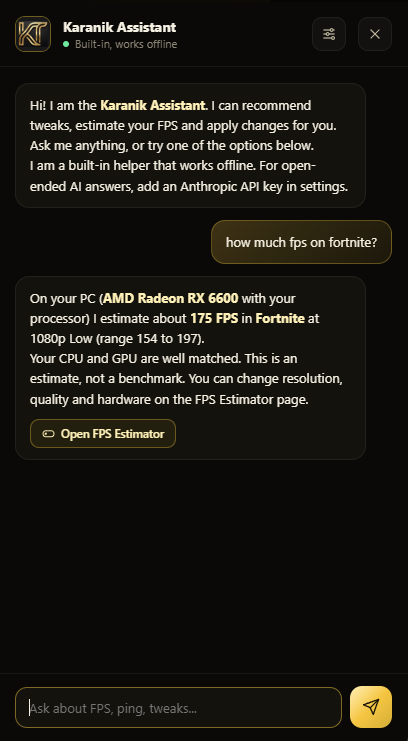
24/7 AI help and support
Ask for help with tweaks, settings, and FPS questions whenever you need it. The built-in assistant can help even when you are offline.
Karanik Tweaks gives you 75 carefully chosen, fully reversible tweaks, a one-click Fortnite preset and a guided BIOS checklist, all in one polished app.
Built for gamers who want lower latency and higher frame rates without digging through registry editors.
Game scheduling priority, GPU scheduling, fullscreen optimizations, mouse acceleration and more, applied with a single switch.
Applies the safe gaming tweaks plus Fortnite-specific settings. Your install location is detected automatically.
Disable Nagle, throttling and Realtek adapter offloads such as interrupt moderation, LSO and RSC for steadier ping.
A step-by-step BIOS checklist with target values and menu paths, plus a button that restarts straight into setup.
Built-in restore point, a risk label on every tweak, and an undo switch for everything you apply.
Clear junk, shader and browser caches, flush DNS, TRIM your SSD and repair system files in one click.
Live CPU, memory and ping monitoring, searchable tweaks, 24/7 AI help and per-game FPS estimates.


Interface preview shown with sample data.
Meet the built-in AI support agent and check estimated frame rates across popular games.
Ask for help with tweaks, settings, and FPS questions whenever you need it. The built-in assistant can help even when you are offline.
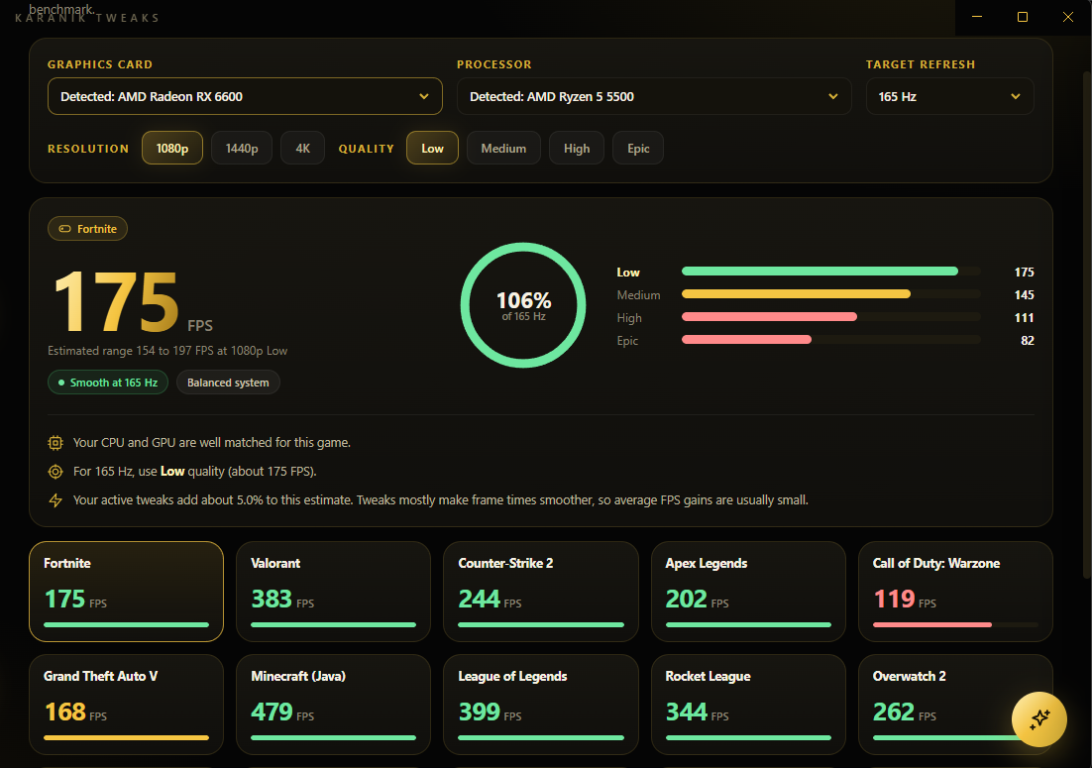
Estimate frame rates across popular games using your CPU, GPU, resolution, and quality settings, then compare expected FPS before you play.
Download the zip and extract the whole folder. Do not run it from inside the zip.
Open Karanik Tweaks as administrator. The welcome screen offers a one-click restore point.
Hit the Fortnite preset or pick your own tweaks, then restart your PC to finish.
Version 1.0 for Windows. Extract the zip and run Karanik Tweaks.exe.
Download for WindowsThe stats database stores download timestamps, not IP addresses. Repeat requests count separately, and a request does not confirm the download completed.
40f084cc8cfaa78b567b72a73b3c49c966f9746d07a1ed2d4c732b6cb0847749Every tweak uses standard Windows settings and can be switched off again. Each one shows a risk level, and the app offers a restore point on first launch. Create one before applying anything.
Karanik Tweaks changes Windows settings, not game files, and does not touch game memory. We cannot speak for any game's anti-cheat rules, so review the tweaks you enable. The optional high CPU priority tweak is marked Medium risk and is off by default.
Most tweaks write to protected parts of Windows, such as services, power plans and network adapters, which requires administrator permission.
BIOS and UEFI options live in your motherboard firmware, which Windows software cannot change. The Firmware Guide lists each recommended value and where to find it, with a button to restart into setup.
Switch a tweak off to undo it, or use "Revert all tweaks" on the dashboard. You can also roll back with the restore point you created.
Make sure you extracted the whole zip first. If it still will not open, press Win+R, type %TEMP%, and look for the file karanik-tweaks.log, which records any startup error.